
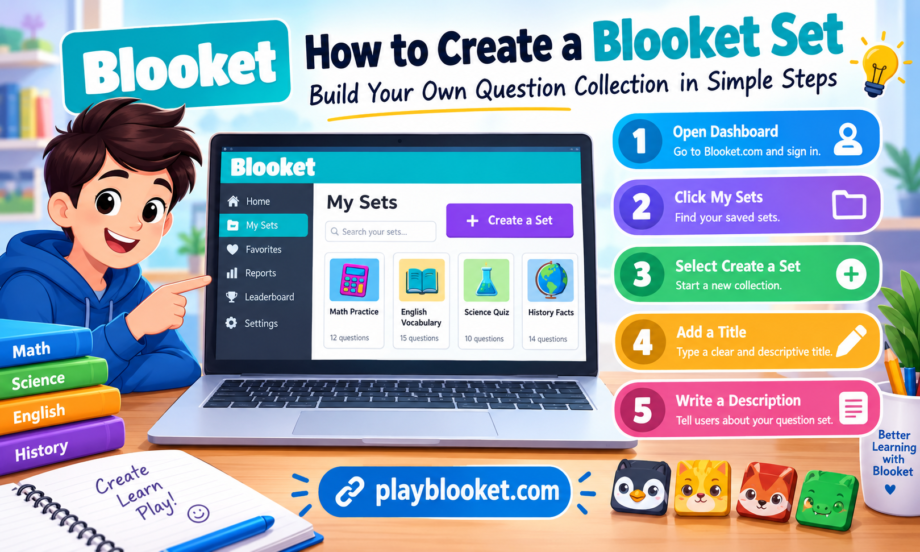
Creating educational activities does not have to be complicated. Teachers, students, and quiz enthusiasts can turn ordinary study material into interactive learning experiences by preparing their own questions and organizing them into a useful collection. Blooket offers a convenient way to build these collections, customize their details, and use them in classroom activities or independent practice.
A well-organized set gives learners a clear topic to explore, helps teachers review important concepts, and makes study sessions more engaging. Instead of searching through scattered notes, users can arrange questions around a single subject and prepare a structured activity that is easy to understand. Whether the goal is to practice vocabulary, review science lessons, or reinforce mathematics skills, careful preparation can make the entire experience more effective.
This guide explains how to create a Blooket question collection, choose a suitable title, write a useful description, organize questions, and prepare everything for future learning activities. It also covers common mistakes and practical suggestions that can help beginners create better educational resources.
Understanding Blooket and Its Question Collections
Blooket is an online learning platform that combines quizzes with interactive game modes. Educators can prepare questions and use them during classroom activities, while students can participate in games designed around the material. The platform makes reviewing information feel more active because learners answer questions instead of simply reading notes.
A question collection provides the foundation for these activities. It groups related questions together so that the material follows a consistent subject or learning objective. For example, a teacher might prepare a collection about multiplication, English grammar, historical events, or the human digestive system.
Each set should have a clear purpose. When the questions focus on a specific topic, learners can understand what they are practicing and teachers can identify which concepts deserve additional attention. A collection containing unrelated questions may still work, but it can make the learning experience less organized.
Before beginning, decide what learners should know after completing the activity. This simple decision makes it easier to choose a title, write a description, and prepare relevant questions.
Step 1: Open the Blooket Dashboard
The first step is to access the Blooket website and open your account. Visit the official platform at Blooket.com and sign in using your available login method. If you are new to the platform, follow the account registration process before trying to create educational material.
After signing in, locate the dashboard. The dashboard provides access to important features for managing your learning activities, including your saved question collections and creation tools.
Look for the My Sets section. Depending on the current interface, the exact wording or position of navigation options may change. The important thing is to locate the area where your existing collections are stored and managed.
Opening this section allows you to review previously created material and begin preparing something new. If you already have several collections, take a moment to understand how they are displayed. Organized titles can make it easier to identify the correct material when you need it later.
Once you have reached the appropriate dashboard area, look for the option to create a new collection. This is the starting point for building your own educational activity.
Step 2: Select the Create a Set Option
After opening My Sets, select Create a Set if that option is available in your current Blooket interface. This action begins the process of creating a new question collection.
You may be asked to provide information about the material before adding questions. These details help identify the content and explain its purpose to other users. Take your time with this stage instead of entering random information simply to move forward.
Think about the learners who will use the material. A collection intended for elementary school students should generally use simple wording and familiar concepts. A resource for older students can include more advanced terminology, challenging questions, and detailed explanations where appropriate.
A thoughtfully prepared set starts with a clear learning objective. For example, an English teacher might want students to distinguish between nouns, verbs, and adjectives. A science teacher might focus on the properties of elements or the basic structure of a cell.
Knowing the objective makes the next steps easier because the title, description, and questions can all support the same goal.
Step 3: Add a Clear and Descriptive Title
The title is one of the first things people notice when they encounter your material. It should explain the subject without making users guess what the questions contain.
Avoid vague names such as “Quiz One,” “Practice,” or “My Questions” when a more informative title is possible. These labels may be understandable to the creator initially, but they become confusing when multiple resources are stored in the same account.
Instead, choose a title that identifies the topic and, when useful, the learner’s level or the purpose of the activity.
For example, you could use titles such as:
- Basic Fractions Practice for Grade Five
- English Vocabulary Review for Beginners
- Introduction to the Periodic Table
- World History: Important Events and Dates
- Multiplication Facts for Daily Practice
A descriptive title helps users recognize the correct set quickly. It can also make your resources easier to manage when preparing several classroom activities for different subjects.
Keep the wording concise enough to read comfortably. A title does not need to explain every detail because the description can provide additional information. The main goal is to communicate the central topic accurately.
Before saving the title, check its spelling and make sure it matches the questions you intend to include. A mismatch between the title and the actual content can confuse learners and reduce the usefulness of the activity.
Step 4: Write a Helpful Description
After entering the title, provide a description that tells users what the question collection covers. A good description explains the purpose of the activity and gives learners a general idea of what they will practice.
For example, a description for a mathematics activity could read:
“This question collection helps students practice basic fractions, compare fractional values, and recognize equivalent fractions through short review questions.”
A description for an English activity might say:
“This activity reviews common English vocabulary and helps learners improve their understanding of word meanings through multiple-choice questions.”
These examples communicate the purpose without becoming unnecessarily long.
When preparing a set, avoid descriptions that are too general. A sentence such as “This is a quiz for students” does not tell users much about the actual material. Adding the subject and learning objective makes the description more useful.
You can also mention the intended audience when it helps. For example, beginners, intermediate learners, or students preparing for a particular classroom lesson may benefit from knowing whether the material suits their needs.
Keep the description accurate. If the questions cover only introductory concepts, do not claim that the activity teaches an entire advanced subject. Clear expectations help users choose suitable learning material.
Step 5: Plan the Questions Before Adding Them
Once the basic details are ready, plan the questions that will form the main content. Good questions are more important than simply having a large number of them.
Begin by listing the most important concepts related to the topic. If you are preparing a science activity about the periodic table, your list might include chemical symbols, atomic numbers, element groups, and basic properties.
For a vocabulary activity, the list could include word definitions, synonyms, antonyms, and sentence usage.
This planning stage helps ensure that the set covers the intended material rather than repeating the same idea in slightly different forms.
Consider starting with easier questions before introducing more challenging ones. This structure allows learners to build confidence and gradually apply what they have learned. However, the ideal difficulty depends on the subject and the audience.
Write questions in clear language. Avoid unnecessary wording, confusing sentence structures, or details that do not contribute to the learning objective.
Each question should test a meaningful piece of knowledge. If the answer depends on a complicated interpretation of the wording rather than the subject itself, rewrite the question to make it clearer.
Step 6: Create Accurate Answers and Useful Choices
When a question requires multiple-choice answers, include one correct answer and several plausible alternatives. The incorrect options should be reasonable enough to encourage thought without making the question unfair.
For example, a question about the chemical symbol for oxygen could offer a small number of recognizable chemical symbols as choices. Students would then need to identify the correct one rather than select an obviously unrelated answer.
Avoid using misleading alternatives that depend on ambiguous wording. The goal is to evaluate understanding, not to trick learners.
For typing-answer questions, consider spelling variations and the exact response format supported by the platform. If the platform requires a particular answer, explain relevant conventions when appropriate.
Check every answer before adding it to the collection. A single incorrect answer can create confusion, especially when students use the activity to prepare for a test.
A reliable set should be checked for factual accuracy, consistent terminology, and appropriate difficulty. If the topic includes dates, scientific facts, or technical definitions, consult trustworthy learning materials before finalizing the questions.
Step 7: Organize Questions in a Logical Order
Question order can influence how easily learners follow the material. Although some activities benefit from a mixed order, a carefully planned sequence can be useful when students are learning a topic for the first time.
One option is to organize questions from basic knowledge to more advanced application. Start with definitions, then move toward comparisons, explanations, and practical examples.
For a grammar activity, students might first identify nouns and verbs, then distinguish between different sentence structures, and finally apply the rules to complete sentences.
Another approach is to divide the material into related groups. A history collection, for instance, might move chronologically through important events.
When creating a set for revision, consider including a mixture of straightforward recall questions and questions that require learners to apply their knowledge. This approach gives a broader picture of what students understand.
Avoid unnecessary repetition. Repetition can be helpful for practice, but several nearly identical questions may waste valuable learning time. Instead, test the same concept through different examples when additional reinforcement is needed.
Step 8: Choose a Suitable Learning Purpose
Before finishing the content, consider how the material will be used. Some collections are designed for quick revision before a lesson, while others support longer classroom activities or independent practice.
A short activity can be useful when reviewing a few key facts. A larger collection may be appropriate for a comprehensive lesson or an end-of-unit review.
The ideal size depends on the subject, question complexity, and time available. There is no universal number of questions that makes every activity effective.
If you are creating a set for younger learners, keep the material manageable and avoid overwhelming them with too much information at once. Older learners may be comfortable with more questions, particularly when the subject requires detailed revision.
Think about the learning outcome rather than focusing only on quantity. Twenty well-written questions that cover the important concepts can be more useful than a much longer collection filled with repetitive or confusing material.
Step 9: Review the Title, Description, and Questions
Before using the completed material, review every part of it. Start with the title and confirm that it accurately describes the topic.
Read the description to ensure that it explains the purpose of the activity. Then review the questions and their answers one by one.
Look for spelling mistakes, missing information, unclear wording, and accidental duplication. Confirm that each question has the correct answer and that any answer choices make sense.
It is also useful to consider the experience from the learner’s perspective. Would someone who has not created the material understand what each question asks? Could a question reasonably have more than one correct answer? Is the language appropriate for the intended audience?
These checks help make the set more reliable and easier to use.
If possible, preview the activity or test it yourself before sharing it. A quick review can reveal issues that are easy to miss while creating the content.
Step 10: Save and Manage Your Collection
After completing the required details and questions, use the available save or finish option in the Blooket interface. Follow any prompts that appear and confirm that the material has been saved successfully.
The exact controls can vary as the platform changes, so follow the labels currently displayed on your screen.
Once saved, return to My Sets or the relevant management area to locate your new collection. Confirm that its title appears correctly and that you can open it again.
Good organization becomes increasingly important as your library grows. Use consistent naming conventions for related resources. For example, you might include the subject, grade level, or chapter in each title.
If you prepare several activities for one course, clear titles can help you find the correct set without opening every item individually.
Review older material periodically. If a lesson changes or you discover an incorrect answer, update the collection when editing options are available. Maintaining accurate resources helps keep them useful over time.
Common Mistakes to Avoid
Several small mistakes can make a question collection less effective. Fortunately, most are easy to prevent with a little planning.
Using an unclear title: A generic title makes it difficult to identify the topic. Choose wording that describes the content directly.
Writing an empty description: A useful description explains the learning objective rather than merely stating that the material contains questions.
Adding unrelated questions: Questions should support a common topic or purpose. Too many unrelated items can make the activity feel disorganized.
Ignoring answer accuracy: Always verify the correct response, particularly for scientific, historical, and technical subjects.
Making every question difficult: A balanced progression can help learners build confidence before attempting challenging questions.
Forgetting to review the finished material: Spelling errors, duplicated questions, and confusing answer choices can reduce the quality of an otherwise useful resource.
Avoiding these mistakes makes the creation process smoother and gives learners a better experience.
Tips for Making Your Blooket Collection More Effective
A strong educational resource does more than collect information. It helps learners practice important concepts in a way that supports their goals.
First, define one main learning objective. A focused activity is usually easier to prepare and evaluate than a collection that tries to cover too many unrelated subjects.
Second, use examples that match the learners’ experience. Familiar examples can help students connect new information with what they already know.
Third, balance question types where the platform and your activity design allow it. Recall questions can check basic knowledge, while application questions encourage students to use information in context.
Fourth, keep wording consistent. If you introduce a technical term, use it accurately throughout the material.
Fifth, use feedback from actual learners when possible. If students repeatedly misunderstand a question, determine whether they need additional instruction or whether the wording should be improved.
Finally, treat each set as a learning resource that can be refined. You do not have to make every detail perfect during the first attempt. Reviewing results and making thoughtful improvements can help you develop more useful activities over time.
Why Creating Your Own Questions Can Help
Preparing your own questions gives you control over the subject, difficulty, and learning objectives. Instead of relying entirely on existing resources, you can build material that matches a specific lesson or classroom requirement.
Teachers can use this approach to review concepts taught during the week. Students can create practice questions to check their own understanding. Tutors can prepare activities that focus on areas where an individual learner needs additional support.
Creating a set also encourages the author to examine the subject carefully. Writing a clear question requires understanding what information matters and how to express it accurately.
However, interactive quizzes should complement other learning methods rather than replace every form of instruction. Reading, discussion, demonstrations, and practical exercises can provide context that a question activity alone may not offer.
When combined with other teaching methods, a well-prepared Blooket collection can become a useful part of a broader learning plan.
Final Thoughts
Creating an educational activity on Blooket starts with a few simple decisions: open your dashboard, find My Sets, select Create a Set, and provide a descriptive title and helpful explanation. From there, focus on preparing accurate questions, organizing the material, and checking the finished result.
The quality of a set depends on more than its length. Clear objectives, relevant questions, accurate answers, and thoughtful organization all contribute to a better learning experience.
Whether you are a teacher preparing classroom revision or a student building a personal study resource, taking time to plan the content can make the process more rewarding. Begin with one topic, create questions that support a specific goal, and improve the material as you learn what works best.
With a little preparation, Blooket can help turn ordinary review questions into structured, interactive learning activities that are easier to manage and more engaging to practice.
