
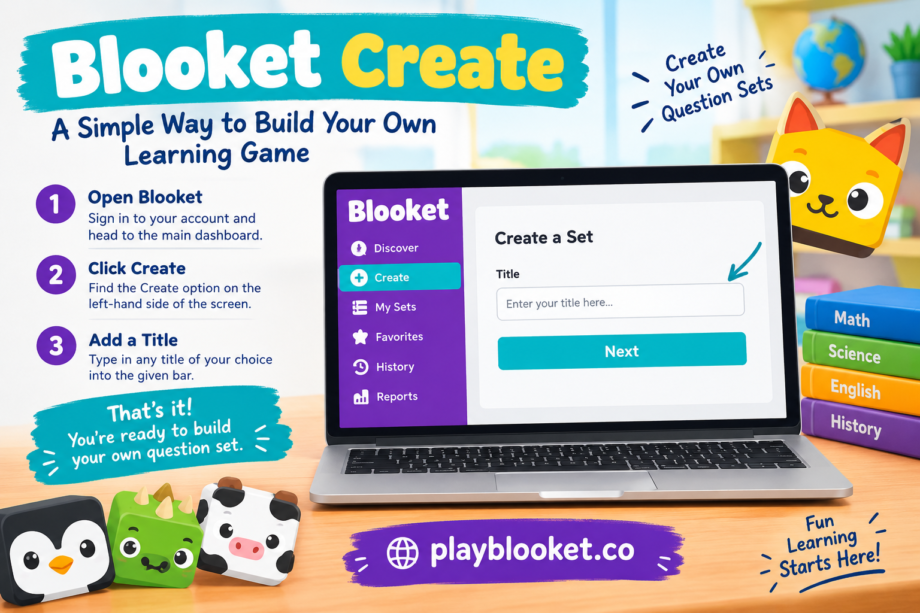
Creating a classroom game does not have to be complicated. With Blooket Create, teachers can put together their own question sets and turn an ordinary review activity into something more interactive. The process starts with a few simple steps, so even someone using Blooket for the first time can get started without much trouble.
Start by Opening Blooket
The first thing to do is open Blooket and sign in to your account. Once you reach the main dashboard, look toward the left-hand side of the screen. You should see the Create option there.
Click Create to begin building a new question set. This takes you to the area where you can enter the basic information for your game.
Choose a Title for Your Set
After selecting Create, you will be asked to give your question set a title. You can choose any name that makes sense for your lesson or activity.
For example, a teacher reviewing multiplication might use a title such as “Multiplication Practice,” while a vocabulary lesson could have a name like “Weekly Vocabulary Review.” A clear title makes it easier to recognize the set later, especially when you create several different activities.
Enter your preferred title into the available title bar and continue to the next step.
Keep the Title Simple and Useful
There is no need to make the title complicated. A short and descriptive name is usually the easiest choice. If the set is designed for a particular class, subject, or topic, including that information in the title can help you find it quickly later.
Once your title is entered, you are ready to continue creating your question set. From there, you can add questions and answers according to the lesson you want students to practice.
Why Blooket Create Is Useful
The biggest advantage of Blooket Create is the flexibility it gives teachers. Instead of depending entirely on pre-made activities, you can build questions around the exact material your students are learning.
Whether you are preparing a quick review before a test or creating practice for a new topic, making your own set gives you more control over the activity. The simple creation process also means you can prepare a basic set without spending a lot of time navigating complicated menus.
A Quick Start for New Users
If you are new to Blooket, the creation process is a good place to begin. Open the platform, select Create from the left side of the dashboard, enter a suitable title, and then move forward with your questions.
It really starts with that simple choice: Blooket Create. Once the title is in place, the rest of the set can be developed around the subject and learning goal you have in mind.
